

Savannabay can be used directly inside your conversations with Claude or ChatGPT through MCP (Model Context Protocol).
This allows you to access Savannabay’s intelligence without leaving your preferred AI assistant — combining your own LLM workflow with Savannabay’s SEO and GEO strategy.
What is MCP?
MCP connects Savannabay to your AI chats, allowing Claude or ChatGPT to securely access your project data and tools.
Instead of switching between platforms, you can generate content and run strategic actions directly inside your AI conversation.
One important advantage:
✅ Article generation through MCP does not consume Savannabay credits.
Article Generation with MCP (Main MCP Feature)
The most powerful use of MCP is article generation.
When generating articles through MCP:
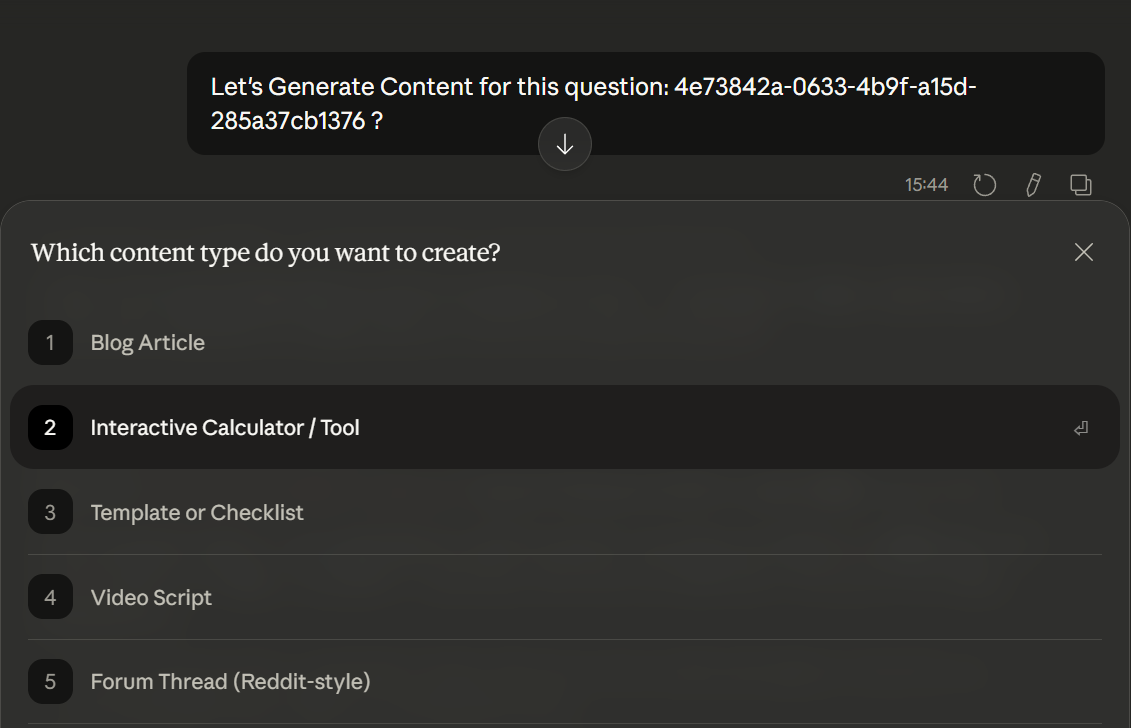
The AI guides you through an interview-style conversation
You answer questions about your brand, experience, or topic
The article is built progressively based on your inputs
You can follow the entire process inside your chat
This guided approach helps create content that feels more human and aligned with your positioning.
Enhanced Publishing Output
With MCP, Savannabay loads a more advanced system prompt designed specifically for publishing-ready content.
We invested hours studying and improving the system prompt to improve your article generation.
This allows the model to generate:
structured articles
clean HTML output
optional custom CSS formatting
content ready for direct publication
Unlike in-app generation, this workflow uses your own AI model usage, meaning no Savannabay credits are consumed during article creation.
How to Start Using MCP
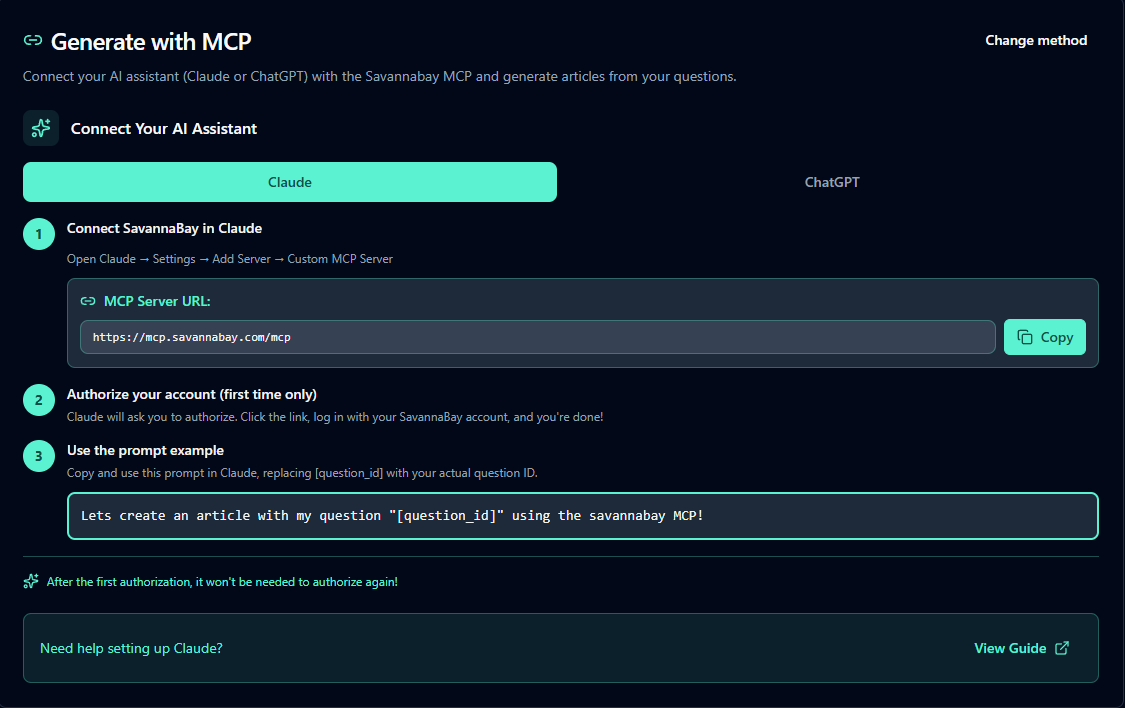
Go to the Generate Content page
Click Generate with MCP
Choose the tutorial for Claude or ChatGPT
Follow the setup instructions to connect your AI chat
Once connected, you can start using Savannabay features directly inside your LLM conversations.
Claude
Step 1: Access Connector Settings
Click the "+" button in the lower left corner of your chat
Hover over "Connectors"
Select "Manage connectors"
Option B - From Settings:
Navigate to Settings → Customize → Connectors
Step 2: Add Custom Connector
Click the "+" button next to Connectors
Select "Add custom connector"
Fill in the details:
Name: e.g., "SavannaBay MCP"
Server URL: Your public HTTPS endpoint (e.g., https://mcp.savannabay.com/mcp)
Click "Add" to save
Step 3: Authenticate
If your server requires OAuth, Claude will prompt you to authenticate
Follow the browser login flow
Grant permissions when requested
Step 4: Enable in Chats
Start a new conversation or open an existing one
Click the "+" button in the lower left corner
Select "Connectors"
Enable your custom connector (if it is not ebabled)
Start using it! Ask Claude to use your MCP tools
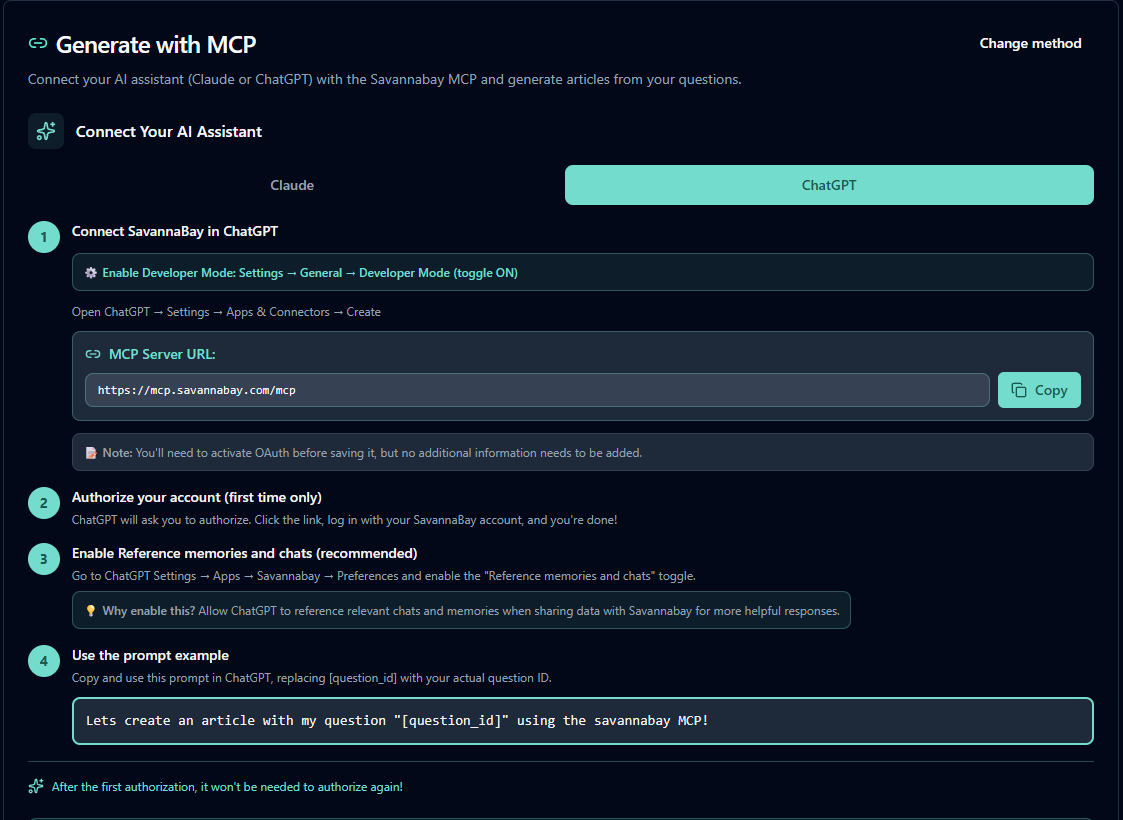
ChatGPT
Important: You need a payed account (Plus, Team, or Pro)
Step 1: Access Settings
Click on your profile icon in the bottom-left corner of ChatGPT
Navigate to Settings
Select Apps from the left sidebar
Step 2: Enable Developer Mode (Required)
Click on your app settings under Advanced Configuration (gear icon)
Toggle Developer mode to ON (blue)
This allows you to add unverified connectors that can modify or delete data permanently
Warning: Developer mode enables high-risk features. Only enable this if you trust the MCP server you're connecting to.
Step 3: Create a New MCP Application
In the Enabled applications section, click Create application button
Click Advanced configurations → Create application
Step 4: Fill in Application Details
You'll need to provide:
Name: e.g., "Savannabay's MCP" or any descriptive name
Description (optional): e.g., "Using Savannabay with MCP"
MCP Server URL: Your server endpoint (
https://mcp.savannabay.com/mcp)Authentication: Select authentication type (OAuth is common)
Step 5: Review and Create
Check the Advanced configurations section
Review OAuth configurations if detected/required
Accept the risk warning checkbox: "I understand and want to continue"
Click Create (bottom-right button)
Step 6: Enable Your MCP Server
Your new MCP application will appear in the Drafts section (private apps you created in developer mode)
Toggle it ON or click on it to enable for your chats
Step 7: Use It in Chats
Start a new chat or open an existing one
Your MCP server tools will be available automatically when enabled
You can test it with commands like: "@[your MCP name] list my own keywords"
Important: You need to write the ‘@’ plus the name that you gave to the MCP tool before the prompt comands, do not copy and paste this part. Or click at ‘+’ button at the left of the textbox → plus and select your MCP tool name
Then you can already go to your chatGPT or Claude and ask a content generation:
Other Features Available Through MCP
Besides article generation, MCP also allows you to access additional Savannabay tools.
What you can do in Savannabay with MCP
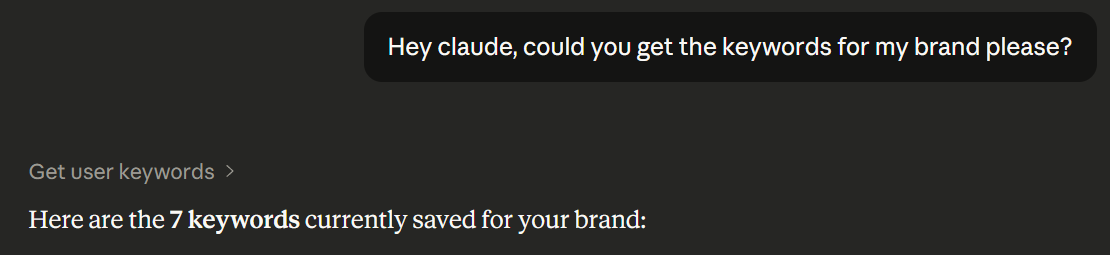
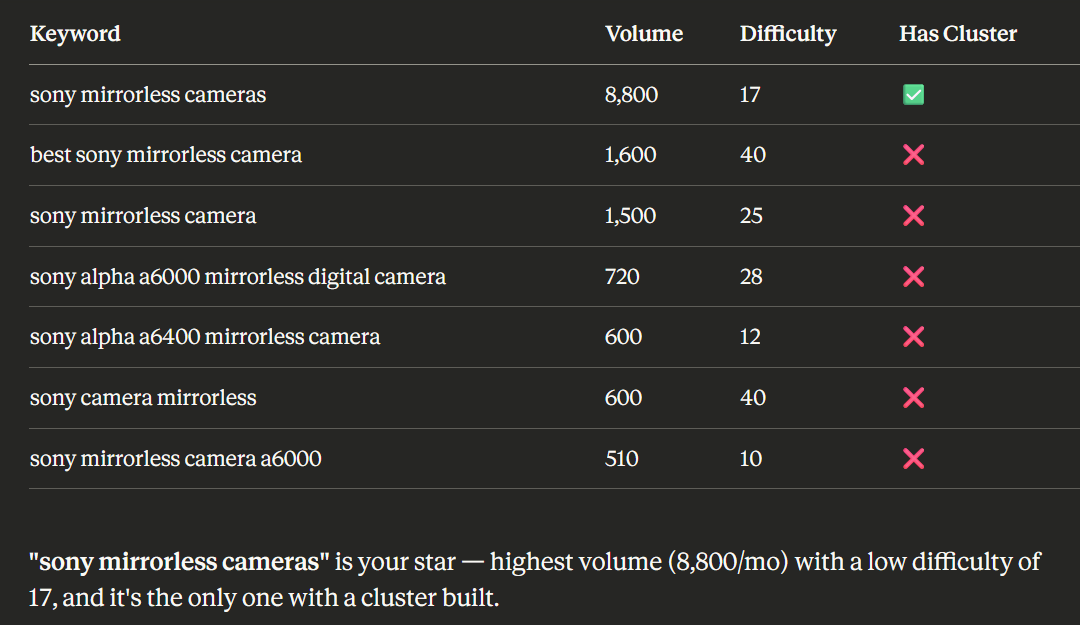
Get Existing Keywords
At any time, you can ask the AI to display your saved keywords.
The model will show:
your keyword list
suggestions on which keywords are most promising to target
Generate Recommendations
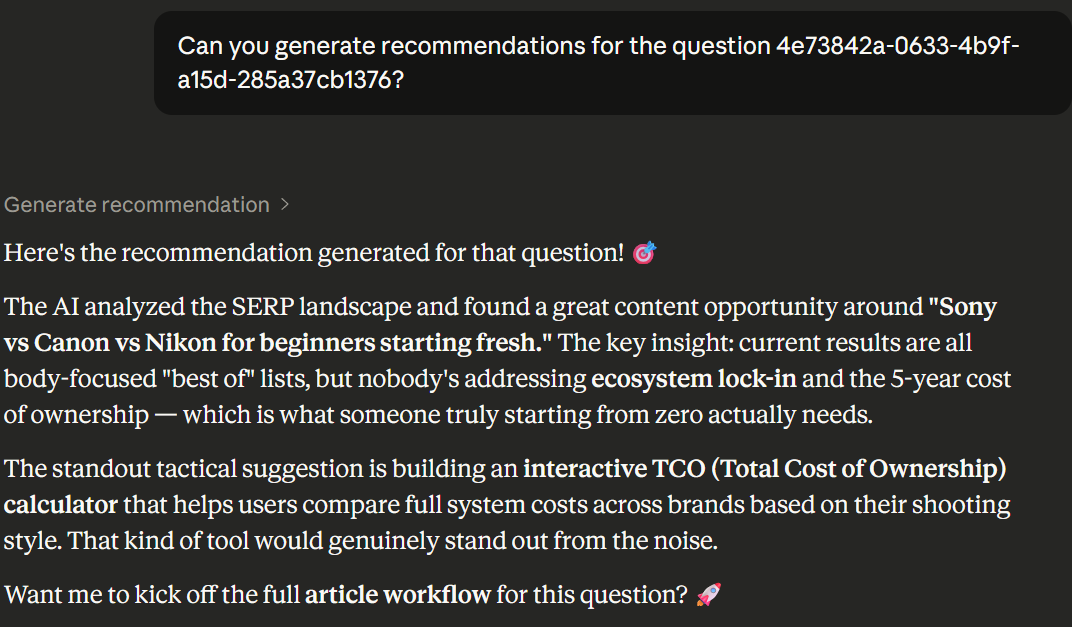
You can request ranking recommendations for a specific AI question.
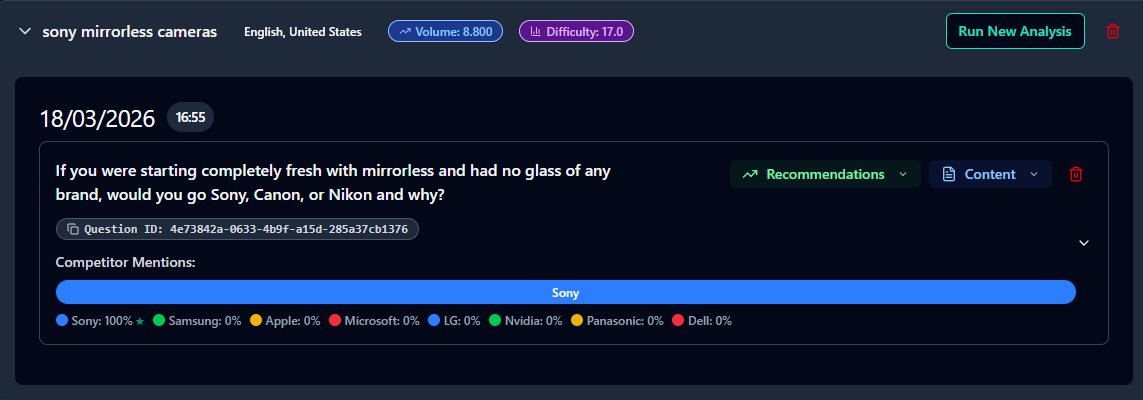
To do this:
Copy the Question ID from the AI Q&A Sets page
Ask Claude or ChatGPT to generate recommendations using that ID
Recommendations follow Savannabay’s Blue Ocean strategy, focusing on differentiation rather than direct competition.
⚠️ Generating recommendations consumes Savannabay credits.
4. Generate Articles
You can also generate articles using MCP.
Simply ask the LLM to generate an article, and it will guide you through steps to create high-quality content.
In general, generating an article involves answering AI-guided questions effectively.
5. View Recommendations
You can ask the LLM to display your existing recommendations for your default brand.
To do this, provide the Question ID, and the system will show all recommendations related to that question—similar to what you see in the Generate Recommendations tool.

Best Practices
Provide detailed inputs:
Savannabay’s AI may ask questions about your brand or experience. Take time to answer thoroughly—this will result in more natural, human-like content.Optimize your content:
After generating an article, ask the AI if it is well optimized for your target keyword. If not, request optimization.Review before publishing:
Always review your content before publishing. AI models can sometimes generate inaccurate information.Generate HTML if needed:
With MCP, the system prompt supports article generation in HTML (not just Markdown). You can create content with custom CSS and publish it directly.